Installation
common information
This was tested at a linux machine and should also work under Windows systems. Working with widows is here not described.
All my software was installed under the directory /opt .
All the systemd files where installed under /etc/systemd/system
Alternative you can run the application with docker-compose (see for informations to run all as docker-compose app)
prerequisites
You must install java 17 for the springboot application vaadineo and the needed JDK for neo4j (database)
install neo4j
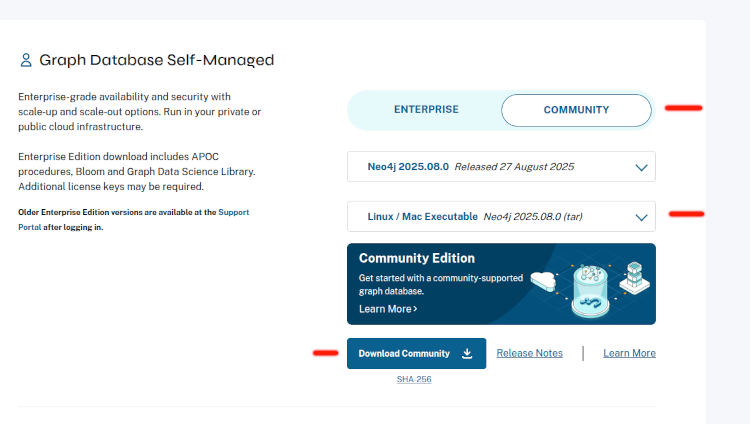
download the tar version of neo4j server goto /opt directory unpack the tar archive if it is a tgz file
tar -xvzf tarfile.tgzif it is a tar file
tar -xvf tarfile.tarThe startup script will be shown later, after the systemd file for neo4j.
install vaadineo
The startup script will be shown later after the systemd file for vaadineo. The application itself is only one single jar archive.
systemd
what is systemd
if you install this under systemd, the application will be started at system startup and also restarted, if the applications fails.
install neo4j as systemd service
filename /etc/systemd/system/neo4j.service
[Unit]
Description=Graphdatabase NEO4J
After=network.target auditd.service
[Service]
Type=forking
ExecStart=/opt/neo4j/neo4jStartup.sh
ExecStop=/opt/neo4j/neo4j/bin/neo4j stop
ExecReload=/bin/kill -HUP $MAINPID
KillMode=process
Restart=on-failure
[Install]
WantedBy=multi-user.target
Alias=neo4j.service
install vaadineo as systemd Service
filename: /etc/systemd/system/neoc.service
[Unit]
Description=vaadineo LMS with graph db neo4j
After=network.target auditd.service
[Service]
Type=forking
ExecStart=/opt/neoc/neocStartup.sh
ExecReload=/bin/kill -HUP $MAINPID
KillMode=process
PIDFile=/run/neoc.pid
Restart=on-failure
RestartSec=3
[Install]
WantedBy=multi-user.target
Alias=neoc.service
start / stop scripts
start / stop script for neo4j Database
/opt/neo4j/neo4jStartup.sh
and contains (see also systemd file)
!/bin/bash
#
#
#######################################################
ulimit -n 100000
ulimit -a
export JAVA_HOME=/usr/lib/jvm/java-11-openjdk-amd64/
export JAVA_OPTS="-Xms7G -Xmx7G"
/opt/neo4j/neo4j/bin/neo4j start
start / stop Script vaadineo
see above referenced in systemd file above
The Application is a SpringBoot 3.x Application that uses Vaadin 24.x for the UI.
Here is a start / stop script for starting the application (see also systemd file) filename:
/opt/neoc/neocStartup.sh
and contains (see also systemd file)
!/bin/bash
#
###################################################################
export JAVA_HOME=/opt/jdk/jdk17
export PATH=$JAVA_HOME/bin:$PATH
#set -x
#export OPTIONS="-Dfeature.lti13.enabled=true -Xlog:gc*,gc+phases=debug"
export OPTIONS="-Dfeature.lti13.enabled=true "
#export OPTIONS=""
#
# example if neo4j and application on the same host
#
# export NEO4J_BOLT_URI=bolt://localhost:7687
# export NEO4J_HTTP_URI=http://localhost:7474
#
# you must take your values !!!!
#
export NEO4J_BOLT_URI=bolt://<YOUR_HOST>:7687
export NEO4J_HTTP_URI=http://<YOUR_HOST>:7474
export NEO4J_USER=<YOUR_USER_NAME>
export NEO4J_PASSWORD=<YOUR_PASSWORD>
#
#  or for internet your external hostname
#  https://<YOUR_HOST_NAME_IN_THE_INTERNET>/
#  add a trailing /  !!!!!!
#
export PLATFORM_BASE_URI=http://localhost:9080/
#
#  should be like ist is, take care that you have
#  write, read access to VAADINEO_FILE_DIR=/var/vaadineo
#
export VAADINEO_FILE_DIR=/var/vaadineo
#
#  change this to your needs or leave it empty
#
export DYNREG_STARTURL=http://192.168.2.206:7080/ltitool/api/v13/lti/registration/

case $1 in
   start)
    exec java -Xms1g -Xmx1G -server  -Dspring.profiles.active=ab ${OPTIONS} -jar /opt/neoc/lms-neo4j-vaadin.jar
    exit 0
     ;;
  stop)
        pid=`ps -ef|grep java| grep lms | gawk '{print $2}'`
        echo "end PID $pid"
        kill -9 $pid

        pid=`ps -ef|grep java| grep lms | gawk '{print $2}'`
        echo "remaining job $pid"
        ;;

 *)
   echo "Usage $0 start|stop"
   ;;
esac
You must set following Environment variables for the neo4j database connection
environment vars for neo4j
NEO4J_BOLT_URI=bolt://localhost:7687
NEO4J_HTTP_URI=http://localhost:7474
NEO4J_USER=<your_neo4j_user>
NEO4J_PASSWORD=<your_neo4j_password>
If you are using the springprofile ab or docker (see -Dspring.profiles.active=ab) the application-properties will use these Environment variables.
other environment vars
#
#  or for internet your external hostname
#  https://<YOUR_HOST_NAME_IN_THE_INTERNET>/
#  add a trailing /  !!!!!!
#
export PLATFORM_BASE_URI=http://localhost:9080/
#
#  should be like ist is, take care that you have
#  write, read access to VAADINEO_FILE_DIR=/var/vaadineo
#
export VAADINEO_FILE_DIR=/var/vaadineo
#
#  change this to your needs or leave it empty
#
export DYNREG_STARTURL=http://192.168.2.206:7080/ltitool/api/v13/lti/registration/
apache configuration
All communication behind the webserver will use http The apache webserver takes every request and forwards the request to the application.
The apache server handles all https communication and talks to the backend http.
You can get certificates for https communication forthe apache webserver from lets encrypt.
part of the https configuration with the redirects for vaadineo
##############################################
ProxyPass         /neoc/  http://localhost:9080/neoc/
ProxyPassReverse  /neoc/  http://localhost:9080/neoc/

<Location /neoc/>
   AllowOverride All
   Order deny,allow
   Allow from all
   Satisfy any
</Location>
###########################################
ProxyPass         /platformapi/  http://localhost:9080/platformapi/
ProxyPassReverse  /platformapi/(.*)  http://localhost:9080/platformapi/(.*)
<Location /platformapi/>
   AllowOverride All
   Order deny,allow
   Allow from all
   Satisfy any
</Location>
you will have in the Definition of the virtual Host some ssl definition:
file
etc/apache2/sites-enabled/000-default-ssl.confand contains /following is only a part of the config file:
<VirtualHost <YOUR_HOSTNAME>:443>
        ServerAdmin webmaster@localhost
        ServerName YOUR_HOSTNAME
        ServerAlias  YOUR_HOSTNAME
        DocumentRoot /var/www/html
        # Available loglevels: trace8, ..., trace1, debug, info, notice, warn,
        # error, crit, alert, emerg.
        # It is also possible to configure the loglevel for particular
        # modules, e.g.
        #LogLevel info ssl:warn
        ErrorLog ${APACHE_LOG_DIR}/error.log
        CustomLog ${APACHE_LOG_DIR}/access.log combined
        # For most configuration files from conf-available/, which are
        # enabled or disabled at a global level, it is possible to
        # include a line for only one particular virtual host. For example the
        # following line enables the CGI configuration for this host only
        # after it has been globally disabled with "a2disconf".
        #Include conf-available/serve-cgi-bin.conf
        #   SSL Engine Switch:
        #   Enable/Disable SSL for this virtual host.
        SSLEngine on
        #   A self-signed (snakeoil) certificate can be created by installing
        #   the ssl-cert package. See
        #   /usr/share/doc/apache2/README.Debian.gz for more info.
        #   If both key and certificate are stored in the same file, only the
        #   SSLCertificateFile directive is needed.
        SSLCertificateFile      /etc/letsencrypt/live/<YOUR_HOSTNAME>/cert.pem
        SSLCertificateKeyFile   /etc/letsencrypt/live/<YOUR_HOSTNAME>/privkey.pem
        #   Server Certificate Chain:
        #   Point SSLCertificateChainFile at a file containing the
        #   concatenation of PEM encoded CA certificates which form the
        #   certificate chain for the server certificate. Alternatively
        #   the referenced file can be the same as SSLCertificateFile
        #   when the CA certificates are directly appended to the server
        #   certificate for convinience.
        SSLCertificateChainFile /etc/letsencrypt/live/<YOUR_HOSTNAME>/fullchain.pem
        #   Certificate Authority (CA):
                  :
                  :
 </Vitual-host>
You can also do the same with nginx webserver or a other webserver of your choice.
You can see the necessary redirects in the apache config file above (/platformapi/ and /neoc/)
Please consult the letsencrypt and the apache/nginx documentation for more information.